- Published on
Composer 2.5 vs Grok 4.5 for frontend
- Authors

- Name
- Mattia Peretti
- @mattperetti
I wanted to see how Composer 2.5 and grok 4.5 handle a small but complete frontend task from scratch. The task was a chat guided pancake builder called PancakeBot. It needed a landing page, a chat panel to guide a user through choosing a base, toppings, and extras, and a live preview that updates as the user selects options. Everything ran inside a fresh Vite React TypeScript project.
I kept both runs as similar as possible. Same scaffold, the same three skills installed from skills.sh, and the exact same prompt, no edits. I accepted the first complete pass from each model and timed to first functional build. The aim was to compare iteration speed and surface level coherence under simple constraints, not to crown a general winner.
Hardware and software
I ran both attempts locally on a MacBook Pro. For the project scaffold I used Vite.
I created the project with:
npm create vite@latest
I selected React and TypeScript in the prompt.
Skills installed
I installed the same three skills from skills.sh for both runs:
The prompt I used
I asked Claude Sonnet to generate a clean, self contained brief for PancakeBot. I used the same text unchanged for both runs.
Build the frontend for "PancakeBot" — an AI agent that helps users design and build custom pancakes — inside the existing React project.

Core concept: The user chats with (or steps through) an AI agent that guides them in creating a custom pancake by selecting a base, toppings, and extras. The agent should feel conversational and helpful, not just a static form.

Key screens/components:

1. Landing / Hero — short intro to PancakeBot, a CTA to "Start Building."
2. Pancake Builder view — the main interactive screen:

- Base selection (e.g., classic, buttermilk, chocolate, gluten-free, vegan)
- Topping selection — multi-select grid of topping cards (fruit, syrups, nuts, whipped cream, chocolate chips, etc.), each with icon/image, name, and toggle-to-add
- Live preview panel showing the pancake stack updating as toppings are added (can be a simple illustrated/stacked visual, doesn't need to be photorealistic)
- Running summary/order ticket showing selected items

3. AI Agent chat panel — a sidebar or bottom panel where the agent gives suggestions ("Since you picked banana, want to add Nutella?"), answers questions, and can auto-apply suggestions to the builder via button/chip actions in the chat.
4. Confirm/Review screen — final pancake summary with an option to "start over" or "save recipe."

Functional requirements:

- State for the current pancake (base, toppings[], extras[]) managed centrally (Context or state library already used in the project).
- Toppings and bases should come from a mock data file (src/data/toppings.js, src/data/bases.js) structured for easy real-API swap later.
- Agent chat should be wired to a placeholder function getAgentResponse(pancakeState, userMessage) that can later be connected to a real LLM API call — stub it with canned/rule-based responses for now.
- Fully responsive (mobile-first), accessible (keyboard nav, alt text, aria-labels on selectable cards).
- Reuse existing project conventions: component structure, styling approach (CSS modules/Tailwind/styled-components — match what's already in the repo), and routing setup.

Nice-to-haves if time allows:

- Animation when a topping is added/removed from the preview.
- "Surprise me" button that has the agent auto-generate a full pancake.
- Dietary filter (vegan, gluten-free, nut-free) that filters both bases and toppings.

Deliverables: New components under src/components/PancakeBuilder/ and src/components/AgentChat/, mock data files, and updated routing/navigation to reach the builder page. Keep components small and composable. Include basic unit tests for the state logic (adding/removing toppings, base selection).
Results
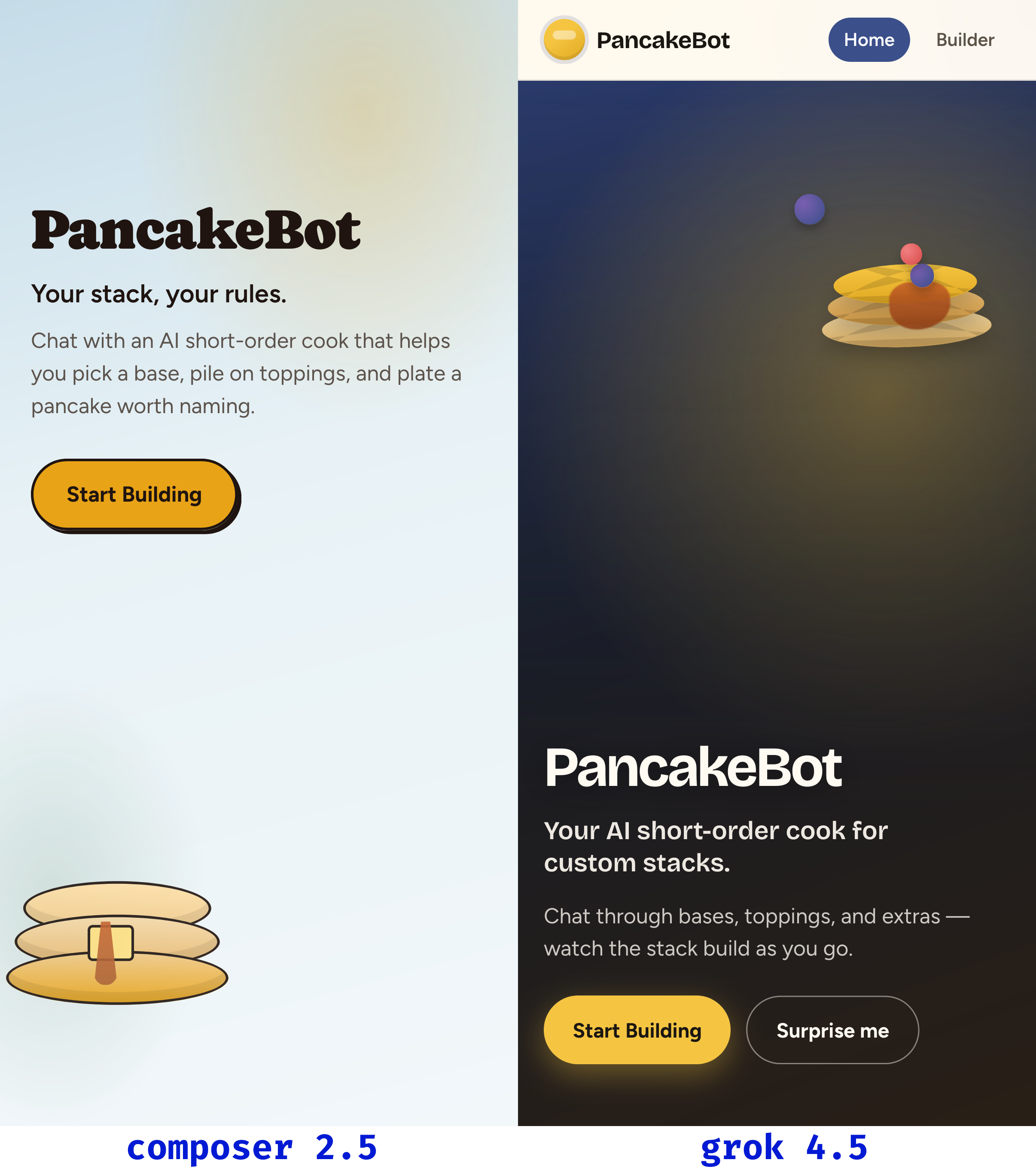
Composer 2.5 completed in 3m 53s, grok 4.5 in 4m 28s. Composer was ~13% faster on this task. Both produced a working PancakeBot from the same prompt in a single pass.
This is one task on one machine, with a specific prompt and the same three skills installed. The timing gives a feel for iteration speed on this setup. It is not a general benchmark and it does not say anything about reliability across runs or different prompts.
Try them yourself:
Notes on setup choices
The skills were there to give both models the same lightweight vocabulary for layout, React structure, and Tailwind conventions. I was careful not to let skill presets dictate structure beyond that. Both models were free to choose component boundaries, state shape, and how to stage the chat flow.
Keeping the prompt short and concrete helped. It named the sections to build, the option sets to support, and the minimal interactions to wire up. There is still room for interpretation, which is where the differences showed up. grok 4.5 leaned into presentation and spacing. Composer 2.5 leaned into getting all steps wired with less ceremony.
What this says, and what it does not
This says the two models are close on a small frontend build started from a blank Vite React TypeScript project with minimal guardrails. Composer 2.5 moved faster to a functional version on this run. grok 4.5 delivered a layout that felt more polished without extra nudging.
It does not say how either behaves under a larger component tree, more open ended product copy, or a multi step refactor with feedback in the loop. It also does not say how they compare if you ask for different design systems, or no Tailwind at all, or if you change the scaffold.
Closing thoughts
For this specific brief I slightly prefer the visual result from grok 4.5. If I had to ship one quickly, I would start from that version and make a couple of small edits. Composer 2.5 was faster here, and the timing matched what I see in day to day use.
The main takeaway is simple. A clear brief plus a minimal scaffold and a couple of shared skills get you to a coherent first pass with either model. I plan to repeat this with feedback in the loop, a richer component tree, and different design constraints to see where the gaps widen or disappear.